By Andrey Zarudnev | April 21st, 2010 |
An official version 4 release happened two days ago on April 19th. The final build has number 554 and makes use of a new online activation system, so we recommend you to receive your free license before upgrading to the official release build in order to use an old styled license data.
Thank you very much for all your help.
By jujdred | April 19th, 2010 |
I just finished my system upgrad from a socket 939 single core with 2gigs ram and a decent USB drive, on which eboostr worked well.
3 Days ago I finalized my appropriations of my Quad Core socket 775 rig with 4gigs on MSI P45 Diamond mobo.
First 2 days were fine with minor annoyances with BIOS updates and a little known fact that MSI P45 Diamond is not compatable with geforce 9800gtx without BIOS 1.4. Once that was taken care of I proceeded to install my favorite app ever, eboostr.
All went well, for about 10 minutes. Then my system locked and I could do NOTHING to retrieve it. Not even the power switch would function. Simply frozen in time.
Repeated several times with same results.
Systematically began disabling apps and services until I was down to an idle RAM usage of 158mb with 0 cpu activity and only eboostr running. All seemed fine until I opened up my google chrome based Comodo Dragon web client.
One page was fine. 2 was great. 3, well, something began to get ‘slugish’. at 4 I was feelin queezy, and on the 5th page at about 5 seconds it locked up again.
the problem is that it locks up at a point that is not recoverable fro some reason. No event log. No crash report. Nothing.
It has been suggested to reinstall Windows 7 Ultimate from scratch and I will do so now.
Just wanted to get this in here before I fry my system
By Bunji94 | April 7th, 2010 |
This is a voice from Japan participated in Ver 4 Beta testing. Due to many inputs from the participants, it is understandable that eBoostr team keeps science as to release of Ver 4. The most of testers takes it that the eBoostr developer team is now dedicated in finalizing the best end-product. With that, the majority of testers is believed to be patient with and positive toward the release of Ver 4 . For the time being, some testers like me are still doing test of RC Build 553. Here, for sharing the information among the testers, I would like to provide some info. I put the following files and folders in the exclusion list, then I drastically could save the capacity of USB Flash memory thumb drive. Simultaneously, the performance of the eBoostr is being increased. Nothing but just FYI. [Bunji94 from Japan]
*.3g2 *.bat *.eps *.inf *.midi *.ogm *.rmm *.torrent
*.3gp *.bik *.eri *.iso *.mka *.pcx *.rmvb *.tp
*.3gp2 *.bmp *.fla *.ivf *.mkv *.pdd *.rnx *.tpr
*.3gpp *.bz2 *.flac *.jpe *.mov *.pdf *.roq *.ts
*.7z *.cab *.flc *.jpeg *.mp2 *.pdp *.rp *.txt
*.aac *.ccd *.fli *.jpg *.mp2v *.pls *.rpm *.vob
*.ac3 *.cda *.flic *.lzh *.mp3 *.png *.rt *.vp6
*.aif *.cue *.flv *.m1a *.mp4 *.psd *.scr *.wav
*.aifc *.cur *.gif *.m1v *.mpa *.pss *.sct *.wax
*.aiff *.d2v *.gz *.m2a *.mpc *.pva *.smi *.wm
*.amr *.dat *.hdmov *.m2v *.mpcpl *.pxr *.smil *.wma
*.amv *.dib *.htm *.m3u *.mpeg *.qt *.smk *.wmp
*.ani *.divx *.html *.m3u8 *.mpg *.ra *.snd *.wmv
*.ape *.drc *.ico *.m4a *.mpv2 *.ram *.swf *.wmx
*.asf *.dsa *.iff *.m4b *.mvx *.rar *.tar *.zip
*.asx *.dsm *.ifo *.m4v *.nds *.ratdvd *.tga
*.au *.dss *.img *.mag *.ogg *.raw *.tgz
*.avi *.dsv *.rle *.tif
*.bak *.dts *.rm *.tiff
*install*.exe
*setup*.exe
C:\Documents and Settings\user_name\ApplicationData\Microsoft\Installer
C:\Documents and Settings\user_name\Local Settings\Temp
C:\Documents and Settings\user_name\Local Settings\Temporary Internet Files
C:\Documents and Settings\user_name\My Documents
C:\RECYCLER
C:\System Volume Information
C:\TEMP
C:\WINDOWS\Downloaded Program Files
C:\WINDOWS\Help
C:\WINDOWS\Installer
C:\WINDOWS\pchealth
C:\WINDOWS\SoftwareDistribution
C:\WINDOWS\system32\CatRoot
C:\WINDOWS\system32\CatRoot2
C:\WINDOWS\system32\dllcache
By flash1000 | April 1st, 2010 |
I wonder if it is an advantage or not, but the geographical fact is here. I am in Japan, and my eBoostr running under the extended trial period has expired this afternoon.
In the pop-up window notifying me the expiration, there is no other way to re-activate eBoostr except purchase it. This is the matter occurs on my Desktop PC.
On the other hand, I remember Bunji94 mentioned about hibernation mode, so I set my Netbook in sleep mode while crossing this expiration time.
Now on my Netbook after the expiration date/time, I turned it on, then eBoostr still running as Bunji94 reported at the time of previous expiration approx. 5 days ago. When I check the license window from Help > About… > Update license…, it definitely tells me that trial period has expired, though.
Is this a matter that I should report as a bug?
By Bunji94 | March 26th, 2010 |
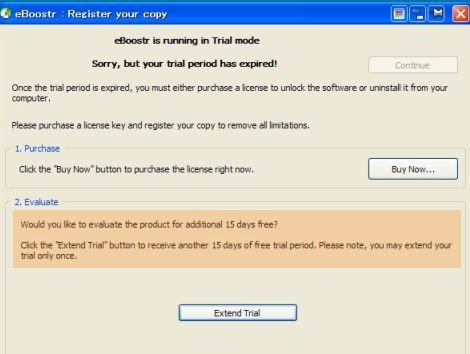
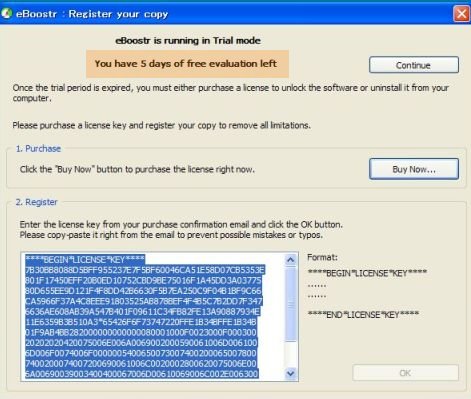
I withdraw my RFC regarding Trial Mode’s questionable behavior after expiration, since RC can be extended for a certain period after rebooting PC per flash 1000 and as I physically confirmed. Now, question is “15 days” or “5 days” extension? While the first pop-up shows “15 days” extension, the control panel shows “5 days”. Is it a typo which happened on either of the interface? No information has been provided for a while. Could you please provide a little bit more information for the RC testers …. Please …. [Bunji94 from Japan]
By Bunji94 | March 25th, 2010 |
Andrey,
I am totally in confusion again. eBoostr pop-up told me yesterday that “This is your last day …..” Today, I checked eBoostr control panel interface and it shows “eBoostr is running. Sorry but your trial period has expired.”
As a matter of fact, eBoostr RC (Build 553) installed in my PC is still alive and is running….. Does it work until 26 Mar, as Col. ONeill implied in the forum a couple of days ago? In any rate, what the message on the control panel I mentioned above is trying to say ……? [Bunji94 from Japan]

By Andrey Zarudnev | March 19th, 2010 |
Finally it is here! :) This is the last test build before the version 4 official release (ETA March 26th.)
The only change in it is the new time limited trial functionality and we ask you to test this new behavior. Please note that the test trial duration is 3 days and if you will use a promo code “11111-11111-11111-11111-11111” then you’ll get 5 days of evaluation.
This build finally completes all UI changes so we are ready to finalize all translations. Please check the following post if you’d like to join our translation team. Thank you.
eBoostr RC 553 (26727 downloads )
By Andrey Zarudnev | |
Has eBoostr not yet been translated into your native language? Would you like to help us with a new translation? All you need to do is to edit a simple text file with all the words and phrases. No programming skills required.
Fully translated languages:
- English
- Russian / Русский
- Japanese / 日本語
- French / Français
- Dutch / Nederlands
- Italian / Italiano
- German / Deutsch
- Chinese Simplified / 简体中文
- Chinese Traditional / 繁體中文
- Portuguese / Português
- Korean / 한국어
- Spanish / Español
Partially translated languages:
- French (Canada) / Français (Canada)
- Greek / Ελληνικά
- Spanish (Latino) / Español (Latino)
- Turkish / Türkçe
- Esperanto
- Hebrew / עברית
- Norwegian / Norsk
- Portuguese (Brazil) / Português (Brasileiro)
- Serbian / Srpski
- Ukranian / Українська
- Finnish / Suomi
- Czech / Česky
- Danish / Dansk
- Hungarian / Magyar
- Bulgarian / Български
- Polish / Polski
- Swedish / Svenska
- Sinhala / සිංහල
- Lithuanian / Lietuvių
- Arabic / عربي
- Belarusian / Беларуская
- Thai / ภาษาไทย
- Slovak / Slovenčina
- Croatian / Hrvatski
- Macedonian / Македонски
- Vietnamese / Tiếng Việt
- Indonesian / Bahasa Indonesia
- Romanian / Română
To translate the program interface into your language, please mail us to beta@eboostr.com to receive a simple text file with the strings to be translated. Edit the needed words and phrases. Save the file and send it back to us. Leave a comment to this post that you have made a translation.
Thank you for your cooperation!
By Bunji94 | March 18th, 2010 |
I appreciate three comments responded to my one posted on 15 Mar. Everyone seems to be expecting RC release, but I believe it will not be released because I found that eBoostr Japan HP announced to start selling eBoostr Ver 4 on 19 Mar. Even though the most of people reading this cannot read Japanese words, please try to visit http://www.eboostr.jp/ and scroll down the screen. You’ll see “eBoostr 4” and Japanese words of “2010年03月19日” (which means 2010, Mar, 19). It is very interesting if you visit eBoostr’s each language HP by changing the language. I checked all of them and found only Japanese site announced to start selling Ver 4 from 19 Mar. Well, I can’t figure out what’s going on …. In any rate, it indicates no RC will be released. Sorry for unfavorable news.
Yet, I believe 2-hrs Run Out Trial Version is unreasonable change, because the 2nd paragraph of the eBoostr 4 (BETA) End-User License Agreement is stating that “SOFTWARE TRIAL VERSION: The product trial version is fully functional for fours hours after each operating system boot, after this time the product stops functioning….” I mean, it says “4 hours”. Sudden change of run-out time from 2 to 4 can be breach of agreement, isn’t it? eBoostr is a good software and I may buy it, but some course of actions taken by eBoostr developer team appears to be not fair.
By Bunji94 | March 15th, 2010 |
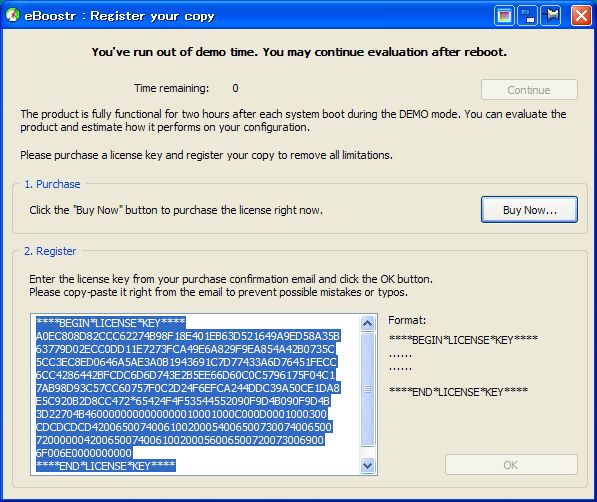
2 hours passed. Then, pop-up appeared, showing “You’ve run out of demo time. You may continue evaluation after reboot” (see attached below). I rebooted PC, and 2hr-limit pop-up appeared again. By checking “About” -> “Upgrade License”, the message on the panel still shows “You can use the currently installed version with no restrictions and no time limits”. Here is a question – Andrey’s “New build 551” posted 5 Mar 2010 shows at the end “Currently we are finalizing the new standard time limited trial mode behavior of the product, so the next build will probably be the RC and will be released in a couple of days.” Does it imply what we are experiencing now? If so, what was the intent by stating “You can use the currently installed version with no restrictions and no time limits” ? I am totally in confusion. Am I wrong?